# Get Purchase History / Restore Purchases
## Get Purchase History
You must be able to restore your users purchases at the click of a button. This is an iOS App Store policy.
Learn more about the data this API call returns
The following is the format of data returned by this block
```javascript
//iOS
[{
purchaseTime:234234234234,
originalPurchaseTime:23423423423423,
purchaseState: 2,
orderId:"adsfasfdf",
originalOrderId:"232adfa",
acknowledged: true,
productId:"rasdf",
transactionReceipt:"LONG STRING"
}]
//Android
[{
"packageName":"edu.fit.jgibb",
"productID":"new_sub",
"acknowledged":true,
"purchaseToken":"LONG STRING",
"purchaseState":1,
"orderId":"GPA.3388-2344-2345-65433",
"purchaseTIme":23423423423423424
}]
```
Notes about purchaseState:
0 = PURCHASING - The transaction is being processed.
1 = PURCHASED - The App Store successfully processed payment.
2 = FAILED - The transaction failed.
3 = RESTORED - iOS OnlyThis transaction restores content previously purchased by the user. Read the originalTransaction properties to obtain information about the original purchase. InAppPurchaseState.RESTORED = 3
4 = DEFERRED - iOS OnlyThe transaction has been received, but its final status is pending external action such as the Ask to Buy feature where a child initiates a new purchase and has to wait for the family organizer's approval. Update your UI to show the deferred state, and wait for another callback that indicates the final status.
A quick note on the blocks above. users have asked where the individualPurchaes variable comes from.
{% embed url="" %}
### Get purchase history step-by-step
{% tabs %}
{% tab title="1" %}
First show the hider to block user interaction, then call `Get Purchase History`
`List of Purchase info` will output a list of objects that are formatted like this:
```
[{
purchaseTime:234234234234, //this will be Epoch time in miliseconds
originalPurchaseTime:23423423423423, //this value is formatted as above
purchaseState: 2,
orderId:"adsfasfdf",
originalOrderId:"232adfa",
acknowledged: true,
productId:"YOUR_PRODUCT_IDs_WILL_BE_HERE",
transactionReceipt:"THIS_IS_A_VERY_LONG_STRING"
}]
[{
purchaseTime:234234234234, //this will be Epoch time in miliseconds
originalPurchaseTime:23423423423423, //this value is formatted as above
purchaseState: 2,
orderId:"adsfasfdf",
originalOrderId:"232adfa",
acknowledged: true,
productId:"YOUR_PRODUCT_IDs_WILL_BE_HERE",
transactionReceipt:"THIS_IS_A_VERY_LONG_STRING"
}]
```
[more info on Epoch time](https://www.epochconverter.com/)
{% endtab %}
{% tab title="2" %}
Assign a temporary variable as an empty list.
{% endtab %}
{% tab title="3" %}
If there's not an error, pass the `List of Purchase Info` to the `Restore Previous Purchases` function, else handle the error`.`
{% endtab %}
{% tab title="4" %}
Handling restoration will look different for each app, however in general it should follow this general format.
Notice the \_listOfPurchases variable. you can create that by clicking the cog wheel, dragging an `input name` block into the `inputs` receiver, and giving it a meaningful name
{% endtab %}
{% tab title="5" %}
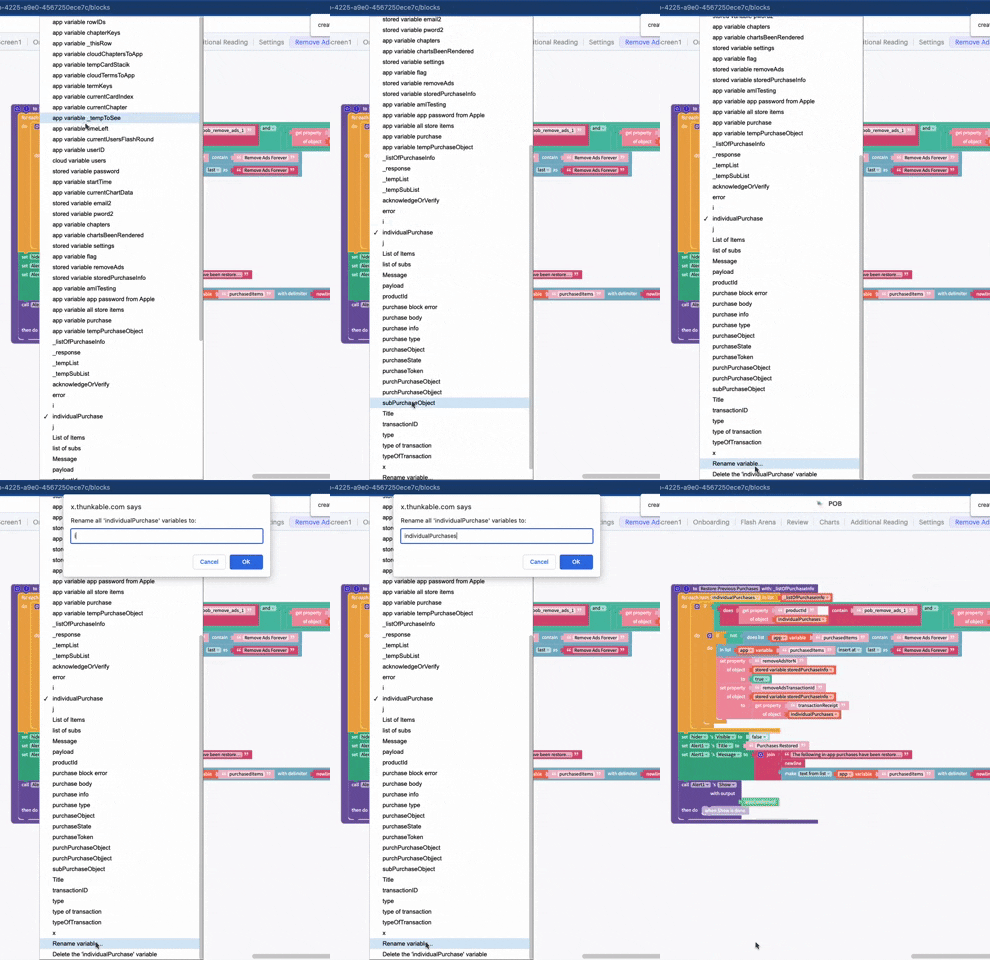
Loop through the list of purchases. You can access this variable by right clicking on the function body and selecting `create _listOfPurchases`
Notice that the 'for each item' variable name is 'individualPurchase'. See how to change those variable names below.
{% endtab %}
{% tab title="6" %}
in the loop, you will first check if that purchases product\_id matches one of your known products, and then the purchaseState to ensure the product's purchase is still valid.
There should be one of these for each item you have in your app using an if/else if/else allowing for 1 check per product.
{% endtab %}
{% tab title="7" %}
if the item passed the checks in **step 6,** check if `purchasedItems` list contains that purchase and if not, add it to the list.
{% endtab %}
{% tab title="8" %}
The final step is to save the state of the purchase locally so that you do not need to verify purchases every day. It is recommended to regularly [check that subscriptions are still valid](#verify-ios-transaction-and-purchase-status).
In this example, we store a T/F value for the purchase as well as the transactionReceipt. This allows the app to permit/block access to the purchased item and allows the app to check if the purchase is still valid again in the future.
{% endtab %}
{% tab title="9" %}
In our example, we display an alert to the user to display the restored purchases. This is not required, though highly recommended as your users will appreciate that information. ***The main purpose of a workflow like this would be to be able to\*\*\*\* ****restore purchases**** \*\*\*\*if the user has to reinstall the app or changes phone***
{% endtab %}
{% endtabs %}
##
---
# Agent Instructions: Querying This Documentation
If you need additional information that is not directly available in this page, you can query the documentation dynamically by asking a question.
Perform an HTTP GET request on the current page URL with the `ask` query parameter:
```
GET https://docs.thunkable.com/~/changes/wHhkjLVeheBnfbpghRnw/in-app-purchases/get-purchase-history-restore-purchases.md?ask=
```
The question should be specific, self-contained, and written in natural language.
The response will contain a direct answer to the question and relevant excerpts and sources from the documentation.
Use this mechanism when the answer is not explicitly present in the current page, you need clarification or additional context, or you want to retrieve related documentation sections.